

Get started with Events and Shipments
What the Events and Shipments modules do, the terms used in this guide, an example supply chain, and where to find each article.
Applies to: the Events and Shipments modules (under Traceability in the left navigation)
Audience: People who have never recorded events in Wholechain
Prerequisites: a Wholechain login, and Trade Items, Locations and Trade Partners already set up
Related: Wholechain Events Overview; Events overview and list navigation; Shipments overview and table controls; Shared event fields; FAQ
Purpose
This guide shows a first-time user how to record supply chain events and how to work with shipments in Wholechain. The Events module records what happens to lots and containers over time: commissioning, observing, shipping, receiving, packing, unpacking, transforming and decommissioning. The Shipments module lists the movements between Locations that those events create, and lets you open a shipment's supply chain.
Every procedure was walked through on the live application, and every label in bold matches the label on screen.
Before you begin
Open Events or Shipments under Traceability in the left navigation. Before you record events, make sure the products, places and companies they refer to exist: Trade Items, Locations and Trade Partners.
Find your starting point
| If you want to... | Go to |
|---|---|
| See every event type and choose the right one | Wholechain Events Overview |
| Fill in the fields every event shares: date, time, time zone, Business Step, Disposition, documents | Shared event fields, chronology and documents |
| Find, filter and read events; open the Map, Diagram and List views | Events overview and list navigation |
| Read and filter the Inbound and Outbound shipment tables | Shipments overview and table controls |
| Record a Ship or Receive for lots with no earlier events | Direct Ship and Direct Receive |
| Connect a Direct Ship or a Receive to the earlier events that came before it | Link Trace Info |
| Get a quick answer | FAQ |
The eight event types each have their own how-to article, linked from the Wholechain Events Overview: Commission, Observe, Aggregate, Disaggregate, Transform, Ship, Receive and Decommission.
Key terms
- Event: a record that something happened to a product at a place and time. Wholechain has eight event types: Commission, Observe, Ship, Receive, Aggregation, Disaggregation, Transform and Decommission.
- Lot: a batch of a product identified by a lot code, such as DEMO-LOT-A01.
- Container: a physical unit, such as a pallet, that holds lots. A container is identified by an SSCC (an 18-digit Serial Shipping Container Code) or by a Logistic ID.
- Business Step and Disposition: two required descriptors on every event. Business Step says what activity took place; Disposition says the state of the product afterwards. Each value is shown with its vocabulary, for example (CBV).
- Event Date and Posted Date: the Event Date is when the event happened; the Posted Date is when the record was entered. They can differ by days. See Shared event fields.
The full list of terms is in the Glossary.
The example supply chain used in this guide
Every article uses the same example chain, so you can follow one product from start to finish.
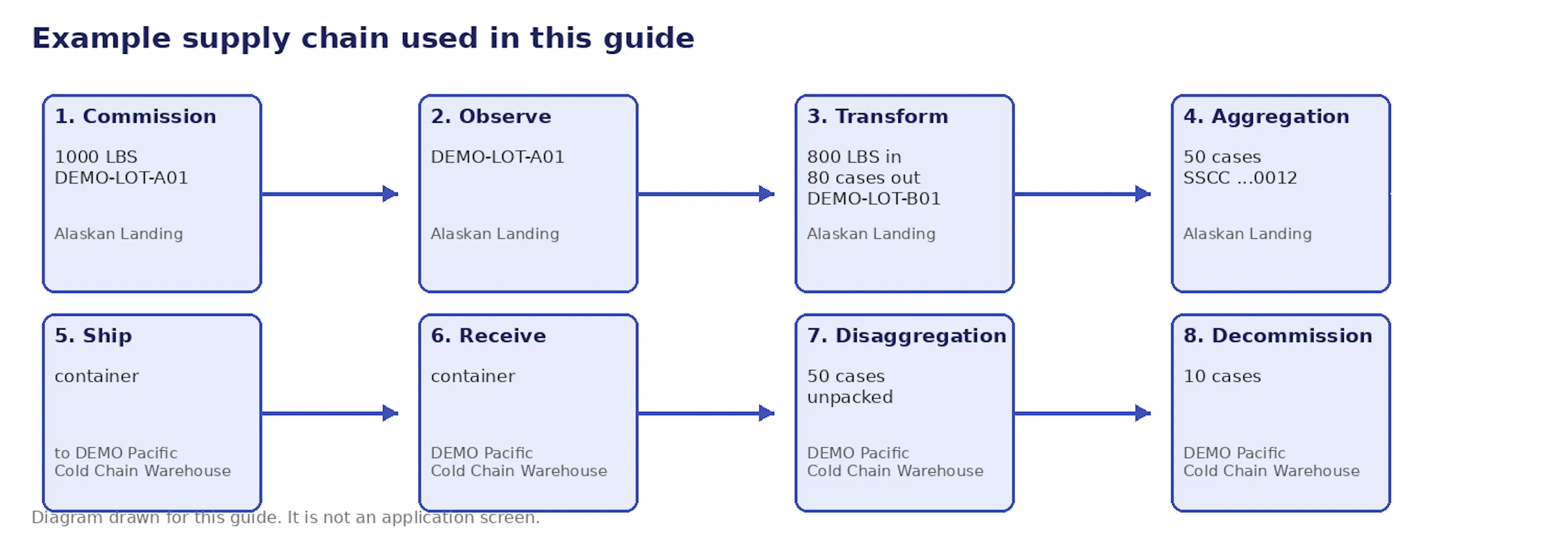
Diagram drawn for this guide: the example supply chain.
The example values are a bulk cod product (DEMO-COD-SUPB, lot DEMO-LOT-A01), a packed cod case product (DEMO-COD-10LB, lot DEMO-LOT-B01), a container with SSCC 006141410000000012, and purchase order DEMO-PO-1001. Your own products, Locations and codes will differ.
Background reading
These articles explain why event-based traceability works the way it does. This guide shows how to do the work in the application.
- Understanding Event-Based Traceability
- Starting Traceability in Wholechain
- Event-Based Traceability FAQ
- GDST and Wholechain
- FSMA 204 and Wholechain
Out of scope
Event Resolver configuration and workflows, Templates and custom data templates, bulk CSV procedures, FSMA requirements and GDST mapping procedures are not covered here.
Field and action reference
Records and how they relate
| Record | What it is | Where it appears |
|---|---|---|
| Event | One recorded activity of one of eight types, at a time and place. | Event List. |
| Lot | A quantity of one product with a lot code. | Lot(s) column; Lot / Serial search. |
| Container | A packed unit identified by an SSCC or Logistic ID that holds lots. | Containers tab of inventory selection; Primary ID in the List view. |
| Shipment | The movement of lots or containers from an origin Location to a destination Location. | Shipments > Inbound and Outbound. |
| Trace | The link between a Direct Ship or a Receive and the earlier events that came before it. | Link Trace Info button and Trace Added label on Outbound; Link Trace Info in the Inbound row menu. |
Where each module lives
| Module | Open it from | Main tabs |
|---|---|---|
| Events | Traceability > Events in the left navigation | Event List, Event Resolver, Templates; Add Events button at the top right |
| Shipments | Traceability > Shipments in the left navigation | Inbound and Outbound |
For the screens in detail, see the Module overview in the Reference Guide.