

Understanding Event-Based Traceability in Wholechain
Wholechain records event-based traceability. That means a sequence of records describing what happened to identified items, where it happened, when…
This series explains the concepts behind Wholechain traceability for people who are new to it. It is not a guide to application screens. To record events in the application, start with the Wholechain Events Overview, which links to a how-to article for every event type.
What Wholechain records
Wholechain records event-based traceability. That means a sequence of records describing what happened to identified items, where it happened, when it happened, and how those items moved or changed.
Each record is an event. One event might say that a lot of whole fish arrived at a processing plant. Another might say that part of that lot became fillets. A third might say that a pallet of fillets left for a distributor. Linked together, these events tell the story of an item from where its recorded history starts to where it ends.
You don't need traceability expertise to use this model. If you can describe what happened on your dock, in your plant, or in your warehouse, you can describe it as events.
Wholechain's events are the source of truth throughout this series. You choose the Wholechain event that matches what happened. Wholechain handles the rest, including how your records line up with industry standards when you exchange data (see Sharing data with other systems).
How events become a diagram and map
Every event carries a Location, an item, and an identified instance. Because events share those details, Wholechain can connect them: the lot that was received at one Location is the same lot that was transformed there, and the output of that transformation is the lot that later shipped.
From those connections, Wholechain builds a supply-chain diagram and map. The diagram shows how items moved between Locations and changed form. The map shows where those Locations are. If your records are incomplete, the picture is incomplete too. Wholechain shows what was recorded. It can't fill in activity nobody recorded.
The eight base events
| Event | What it records | Article |
|---|---|---|
| Commission | Where an item instance's recorded traceability begins. | Commission Events |
| Ship | An item instance leaving a Location, from the sender's side. | Ship Events |
| Receive | An item instance arriving at a Location, from the receiver's side. | Receive Events |
| Transform | Inputs becoming outputs, with the relationship preserved. Also used to change a lot or serial identifier. | Transform Events |
| Aggregate | Items being associated with a logistics unit such as a pallet. | Aggregate Events |
| Disaggregate | Items being separated from a logistics unit. | Disaggregate Events |
| Observe | A measurement or observation, and a quantity adjustment such as a re-weigh. It does not change the Lot number. | Observe Events |
| Decommission | The end of an item instance's active traceability lifecycle. | Decommission Events |
The most common workflows are shipping and receiving, aggregation and disaggregation, and transformation.
Not every supply chain needs every event. A retailer may mostly receive and decommission. A processor may mostly receive, transform, and ship. Choose the events that accurately represent what your operations do and what your customers or regulators require. Don't add events just to make the chain look complete.
Which Event Should I Use?
| If this happened… | Use | Notes |
|---|---|---|
| You are recording an item for the first time and want its traceability to start here. | Commission | Doesn't add missing upstream history. |
| Goods left your Location for another Location. | Ship | Recorded at the origin. |
| Goods arrived at your Location. | Receive | Recorded at the destination. Can also start your recorded history. |
| You processed, combined, or re-identified items so outputs differ from inputs. | Transform | Preserves the input-to-output relationship. |
| You put items onto an identified pallet or container. | Aggregate | Contents aren't changed into a new product. |
| You unloaded or separated a pallet or container's contents. | Disaggregate | Different from receiving. |
| You measured something, or the quantity on hand differs slightly from what is recorded. | Observe | Records information without changing identity. |
| The item (or quantity) is finished: destroyed, expired, or at its last traceable step. | Decommission | Ends active traceability. History stays visible. |
| You need to give a customer shipment traceability but have no prior inventory recorded. | Ship, entered without prior inventory | Still a ship event, not a separate event type. See Starting Traceability in Wholechain. |
When two events seem to fit, read Observe, Transform, and Decommission side by side. Those are the three most often confused.
Master data, item instances, and events
Wholechain separates three layers of information:
- Master data is the set of reusable definitions of Trade Items, Trade Partners, and Locations. You define each once and reuse it.
- Item instances are specific lots or serialized units of an item. A single item (say, "Frozen salmon fillet, 10 kg case") can have many instances over time.
- Events are records of activities involving those instances.
Events operate at the instance level. An item name alone doesn't tell Wholechain, or your customer, which lot or serialized unit was involved. "Salmon fillets" is an item. "Salmon fillets, lot FIL-0412-A" is an instance.
Learn how to set up master data in Trade Items, Locations, and Trade Partners.
How lot and serial identifiers work
- Lots and serials work the same way. Both use the same lot/serial field, and the rules below apply to both.
- Identifiers are unique per item. Wholechain gives every item an underlying unique ID. A lot or serial identifier is always read together with that item. So two Trade Partners can use the same lot string for the same item without any conflict, even when both send to the same account. See Trade Items.
- Your own account rejects duplicates for the same item. Within your account, you can't create two instances of one item with the same lot or serial identifier.
- An identifier is fixed when the instance is created. Instances are created by a commission, or by the receive or ship event that starts your traceability. (See Starting Traceability in Wholechain.) After that, the way to change an identifier on purpose is a transform. If you simply mistyped it, you'll need to remove the event and re-run it.
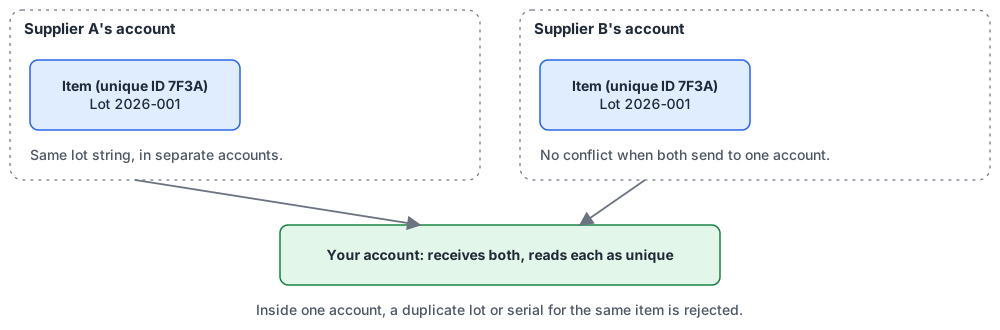
Lot identifiers are read together with the item.
The five core information categories
Most events share the same conceptual baseline of information:
- Location. Where the event occurred.
- Item. The product involved.
- Quantity. The amount involved, expressed in the unit of measure configured for that item.
- Lot or serial identifier. The specific instance involved.
- Event date and time. When the activity occurred.
Treat this as a conceptual baseline, not a complete field list. Different events add their own details. Aggregation, for example, also involves a container identifier. Your customers, integrations, and company policies may ask for more. Follow the requirements that apply to you.
A few clarifications:
- You can use part of a lot. In every event except commission, you can use all or just a portion of a lot's or serial's quantity. Commission creates the instance, so it is the exception.
- Transform events identify the input items and output items, their instance identifiers, and their quantities.
- Ship and receive events identify both an origin and a destination.
- The event location depends on the event. For a ship event, the event location is the origin. For a receive event, it is the destination.
- Locations must be set up under their Trade Partners. Each Location belongs beneath a Trade Partner and should have appropriate address or geographic information. See Locations and Trade Partners.
- Trade Items must have a unit of measure configured for traceability, so quantities mean the same thing across events. See Trade Items.
How events connect: one example
The articles in this series use one running example. It is an illustration, not a required sequence.
Cedar Bay Farms raises salmon and sells to Northline Processing. Northline sells fillets to Metro Fresh Distribution, which supplies a retailer.
- Establish a lot. Cedar Bay Farms commissions 1,000 kg of whole salmon as lot SAL-0412 at its farm Location. (If Cedar Bay isn't recording traceability, Northline could instead start its own history with a receive.)
- Ship and receive. Cedar Bay ships the lot to Northline's processing plant. Northline receives it.
- Transform. Northline transforms 800 kg of SAL-0412 into fillet lot FIL-0412-A. The other 200 kg stays as SAL-0412.
- Internal transfer. Northline ships the fillets from its Processing Plant Location to its Cold Store Location, which is another of its own Locations, and receives them there.
- Aggregate. Northline aggregates cartons of FIL-0412-A and another fillet lot onto a pallet with an SSCC (Serial Shipping Container Code, a GS1 identifier for logistics units).
- Ship and receive again. Northline ships the pallet to Metro Fresh. Metro Fresh receives it.
- Disaggregate. When the pallet is unloaded, Metro Fresh disaggregates it so each lot can be handled individually.
- Observe. Metro Fresh records a temperature reading in cold storage.
- Ship onward and end. Metro Fresh ships cartons to a retailer. The retailer receives them and, at its final traceable step, decommissions them.
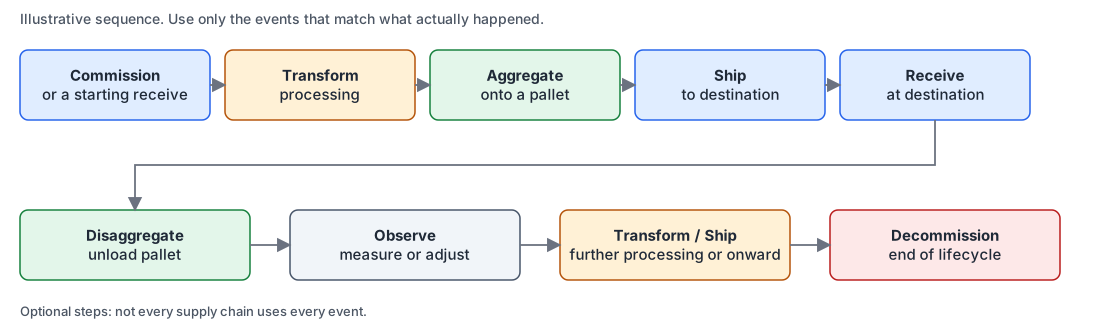
A basic event chain.
Real supply chains aren't one straight line. History branches: one lot can split into several shipments to several customers. It merges: several lots can combine into one output. Both appear in the connected record. Events also include transfers inside one company (between its own Locations) and transfers between separate Trade Partners.
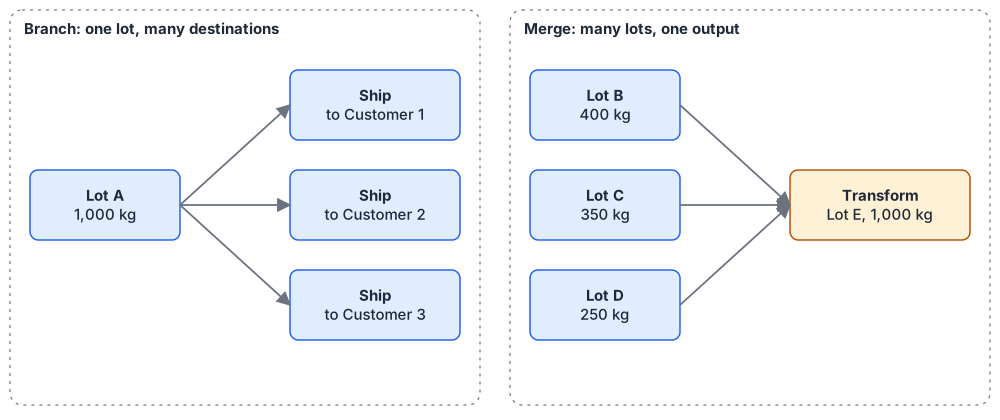
Branching and merging.
Record events in the order they actually happened. If your plant never aggregates, skip aggregation. The goal is an accurate record, not a complete checklist.
Connected Trade Partners: who can record at which Location
When a Trade Partner is Wholechain connected, its Locations are managed through that partner's account. Your account can't record operational events as though it operates those partner-controlled Locations.
Those Locations can still be selected as:
- Destinations for your ship events.
- Sources for your receive events.
Your account therefore can't run commissions, transforms, observations, aggregation, disaggregation, decommissioning, or internal ship and receive operations at a connected partner's Locations. Those happen in the partner's own account.
A simple example: You record a shipment from your facility to your connected customer's facility. Your customer records receipt at its facility.
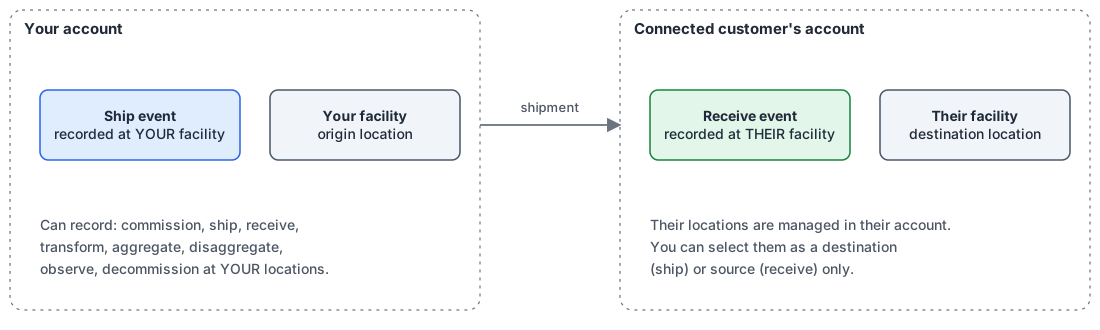
Who records what in a connected shipment.
The important distinction is between a Location used as a reference (a destination or source named in your event) and a Location where your account is authorized to execute an event. Being able to see or select a partner's Location does not give you operational control of it.
See Trade Partners, Locations, and Invite Trade Partners to connect.
Sharing data with other systems
Wholechain supports EPCIS (Electronic Product Code Information Services, a GS1 standard for exchanging traceability event data) interoperability. Wholechain does the translation internally, so you don't need to learn EPCIS event types to use Wholechain. You record Wholechain events, and Wholechain handles the mapping when data is exchanged.
Wholechain also sends traceability data to systems that use more restricted, proprietary formats, including ReposiTrak, iFoodDS, and FoodLogiQ. Those formats are defined either entirely by those companies or by them in collaboration with Wholechain.
What this means in practice:
- Wholechain sends. If you want your Wholechain records to reach a customer using one of these systems, Wholechain's integration sends them.
- Receiving works differently. If your suppliers use one of these systems and you want their data in Wholechain, check with that system whether it supports EPCIS or GDST, or has an integration with Wholechain, to send data to Wholechain customers.
- Receiving systems decide what they accept. A system may accept only certain event types, fields, or predefined datasets. Recording a complete chain in Wholechain doesn't guarantee another system receives or displays every upstream event.
For event types, fields, upstream pass-through, and any extra data each system expects, check with that system. To switch on one of these integrations in Wholechain, see Integrations and API keys.
Notes on standards and regulations
These are quick pointers. Each has its own Wholechain article with the detail.
- GDST (Global Dialogue on Seafood Traceability) is a seafood-industry standard for interoperable traceability data. Wholechain supports GDST workflows. See GDST and Wholechain.
- FSMA 204 (the U.S. FDA Food Traceability Rule) is a U.S. regulation that requires certain businesses to keep specific traceability records. It is a regulation, not a data-exchange standard. See FSMA 204 and Wholechain.
Using Wholechain, choosing an event, or following any article in this series does not by itself make you compliant with a standard or a regulation. Check the requirements that apply to you.
Related documentation
- To record events in the application, see the Wholechain Events Overview, which links to the how-to article for each event type.
- Event articles: Commission · Ship · Receive · Transform · Aggregate · Disaggregate · Observe · Decommission
- Starting Traceability in Wholechain
- Event-Based Traceability FAQ
- Trade Items · Locations · Trade Partners
- Invite Trade Partners to connect
- GDST and Wholechain · FSMA 204 and Wholechain
- Need help mapping your processes to events? Email support@wholechain.com.