

Starting Traceability in Wholechain
Three ways to start recording traceability in Wholechain without your whole supply chain's cooperation: a commission, a receive, or a ship entered without prior inventory.
This page explains the concept. Start with Understanding Event-Based Traceability in Wholechain for shared concepts. To record events in the app, see the Wholechain Events Overview.
You don't need your whole supply chain's cooperation to begin. Wholechain supports three ways to start recording traceability: a commission, a receive, or a ship entered without prior inventory. Each one starts your recorded history from a particular point. None of them creates evidence of activities that were never recorded.
Starting with a receive or a ship doesn't add new event types. Wholechain still has eight base events.
Approach 1: Commission
Use it when you are intentionally establishing the beginning of recorded traceability for an instance, such as at harvest, at packing, or when you first document something you create.
What it gives you: A first record for the instance at your Location, which later events build on.
What it doesn't do: It doesn't attach earlier history, now or later. If goods came from a supplier, commission doesn't connect to the supplier's records.
See Commission Events. To record one, see Commission.
Approach 2: Receive
Use it when you want to begin traceability at the arrival of goods into your facility, including when upstream records are unavailable.
What it gives you: A mid-supply-chain actor can record what happens within its facilities and pass that history downstream to its customers.
What it doesn't do: It doesn't fill in what happened before arrival. Your customers will see your history, beginning at receipt.
If your supplier records later: Supplier data often lags behind your own when companies are getting started. A Receive posted with Direct Receive doesn't require an earlier Ship, and it lets you log your receive before the supplier's ship event is posted. Wholechain's Event Resolver can link the supplier's ship event to your receive event afterward. When a Receive is linked with Link Trace Info, a Ship is required: it is the only event type that can be linked to a Receive. On a Receive, Link Trace Info lets you link upstream events that occurred with a date/time prior to the Direct Receive's date/time. See Direct Ship and Direct Receive and Link Trace Info.
See Receive Events. To record one, see Receive.
Approach 3: Ship without prior inventory (shipment entry)
Use it when you need to give a customer shipment traceability but haven't previously recorded inventory for those lots. Wholechain supports a shipment entry workflow that lets you submit shipment information without previously recorded inventory.
What it's for: Quick onboarding, and giving your customers shipment traceability right away, before you've built up recorded inventory.
How it relates to the base events: A ship entered without prior inventory is a type of ship event. It is not a separate type of traceability event. What differs is where the shipment's contents come from. A standard ship event draws on inventory you've already recorded, and it can use all or only part of a lot. A shipment entry doesn't need previously recorded inventory for those lots.
What it doesn't do: It doesn't create records of activities before the shipment. The history it provides starts at the shipment.
How to record it: In the app, a shipment with no prior inventory is a Direct Ship. See Direct Ship and Direct Receive. A Direct Ship shows as an Outbound Ship Event in the Outbound Shipments table. To connect it afterward to the events that came before it, use Link Trace Info: adding Trace Info to a Direct Ship in the Outbound tab lets you post events that occurred with a date/time prior to the Direct Ship's date/time. To ship inventory you have already recorded, see Ship.
Your identifier is fixed when you start
A lot or serial identifier is fixed when the instance is created, and the events that create instances at the start of your history are a commission, a receive, or a ship entered without prior inventory. Check the identifier before you record. Later, the way to change it is a transform. See How lot and serial identifiers work.
Which approach should I use?
| Commission | Receive | Ship without prior inventory | |
|---|---|---|---|
| Best when | You create or first document the item. | Goods arrive and upstream records aren't available. | You need to give customers shipment traceability now and have no inventory recorded. |
| History starts at | Your commission record. | Your receipt. | The shipment. |
| Relies on prior inventory? | No. It creates it. | No. It creates your inventory at the Location. | No. |
| Event type | Commission | Receive | Ship |
| Typical user | First-mile operator or maker. | Processor, distributor, retailer. | Any shipper getting started quickly. |
| Main limit | Doesn't attach earlier history. | Doesn't record what happened before arrival. | Starts and ends with the shipment. |
| Learn more | Commission | Receive | Ship |
If your situation doesn't fit neatly, email support@wholechain.com to talk through your process.
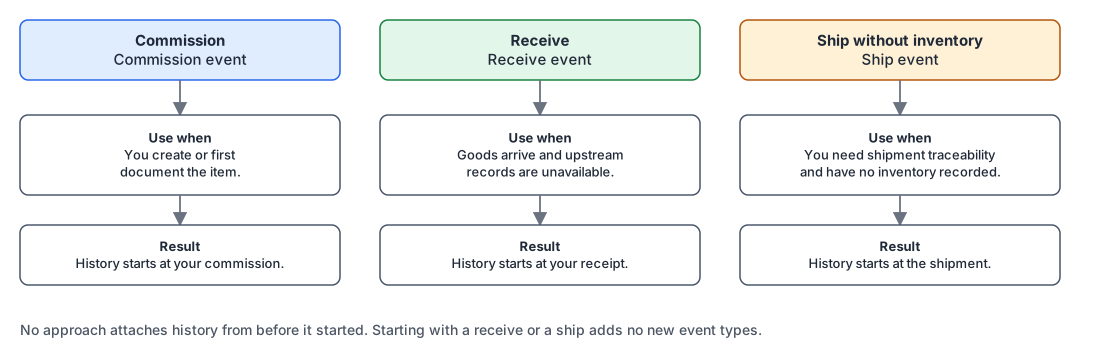
Three ways to start traceability.
How to record your first event
The how-to articles are in the Events guide. The Wholechain Events Overview lists every event type with a link to its article.
- Commission: Commission
- Receive: Receive, or Direct Ship and Direct Receive when no earlier Ship exists
- Ship without prior inventory: Direct Ship and Direct Receive, then Link Trace Info
- Shared Locations: a shared Location can be used as the destination Location on a Ship and as the origin Location on a Receive
What starting traceability does not mean
Beginning to record traceability doesn't prove anything about activities before that point. It also doesn't make you compliant with any standard or regulation.
Before you begin: master data
Whichever approach you pick, first set up:
- Trade Items, with the unit of measure used for traceability: Trade Items
- Locations, beneath their Trade Partners and with address or geographic information: Locations
- Trade Partners, including the companies you ship to and receive from: Trade Partners
Notes on standards and regulations
- GDST (Global Dialogue on Seafood Traceability): Where records must start depends on your role in a seafood supply chain. See GDST and Wholechain.
- FSMA 204 (the U.S. FDA Food Traceability Rule): The rule defines where traceability lot codes and records begin for different roles. See FSMA 204 and Wholechain.
Neither starting approach establishes compliance with a standard or regulation.
Related documentation
- Understanding Event-Based Traceability in Wholechain
- Commission Events · Receive Events · Ship Events · Transform Events
- Event-Based Traceability FAQ
- Events guide: Wholechain Events Overview · Commission · Receive · Ship · Direct Ship and Direct Receive · Link Trace Info
- Trade Items · Locations · Trade Partners
- GDST and Wholechain · FSMA 204 and Wholechain